DoIt 友链与音乐播放器样式自定义记录
这篇记录一下本站对 DoIt 主题里 friend、aplayer 相关 shortcode 的轻量自定义方式。目标是不修改 themes/DoIt 目录,方便以后继续跟随主题更新;同时也尽量让 Markdown 页面保持干净。
文件位置
当前自定义主要放在两个位置:
assets/css/custom-shortcodes.css
layouts/shortcodes/friend-custom.html
custom-shortcodes.css 用来覆盖友链卡片和播放器样式;friend-custom.html 是一个独立 shortcode,不覆盖 DoIt 原生的 friend。
样式开关
在 config.toml 中通过 DoIt 的 params.page.library.css 加载自定义样式:
[params.page.library.css]
customShortcodes = "css/custom-shortcodes.css"
如果想临时回到 DoIt 默认样式,注释这一行即可:
[params.page.library.css]
# customShortcodes = "css/custom-shortcodes.css"需要注意的是,friend-custom 是独立 shortcode。注释 CSS 只会关闭样式覆盖,不会把 friend-custom 自动变回 DoIt 默认 friend。如果想完全使用 DoIt 默认友链样式,需要在 Markdown 里把 friend-custom 改回 friend。
friend-custom 用法
friend-custom 的参数和 DoIt 原生 friend 保持一致,所以原来的友链信息可以直接迁移:
{{< friend-custom name="站点名称" url="https://example.com/" avatar="https://example.com/avatar.png" bio="一句简介" >}}例如:
{{< friend-custom name="Wlcheng' Life" url="https://wlcheng.cc" avatar="https://wlcheng.cc/images/avatar.png" bio="来日方长,何惧车遥马慢" >}}如果要切回 DoIt 默认友链,只需要改 shortcode 名称:
{{< friend name="Wlcheng' Life" url="https://wlcheng.cc" avatar="https://wlcheng.cc/images/avatar.png" bio="来日方长,何惧车遥马慢" >}}音乐播放器
多首自定义音乐使用 DoIt 原生的 aplayer + audio,不要手写播放器 HTML 和 JS:
{{< aplayer fixed=false mini=false autoplay=false theme="#448aff" loop="all" order="list" preload="auto" volume=0.5 mutex=true lrcType=3 listFolded=false listMaxHeight="" storageName="aplayer-setting" >}}
    {{< audio name="小世界" artist="歌之初乐队" url="https://music.163.com/song/media/outer/url?id=2089729192.mp3" cover="https://p1.music.126.net/nrkkraN7jkXiEc6bUj3YnQ==/109951168974029682.jpg?param=130y130" lrc="/audio/lrc/xiaoshijie.lrc" />}}
{{< /aplayer >}}
这里的 lrcType=3 对应 lrc="/audio/lrc/*.lrc" 这种外部歌词文件写法。
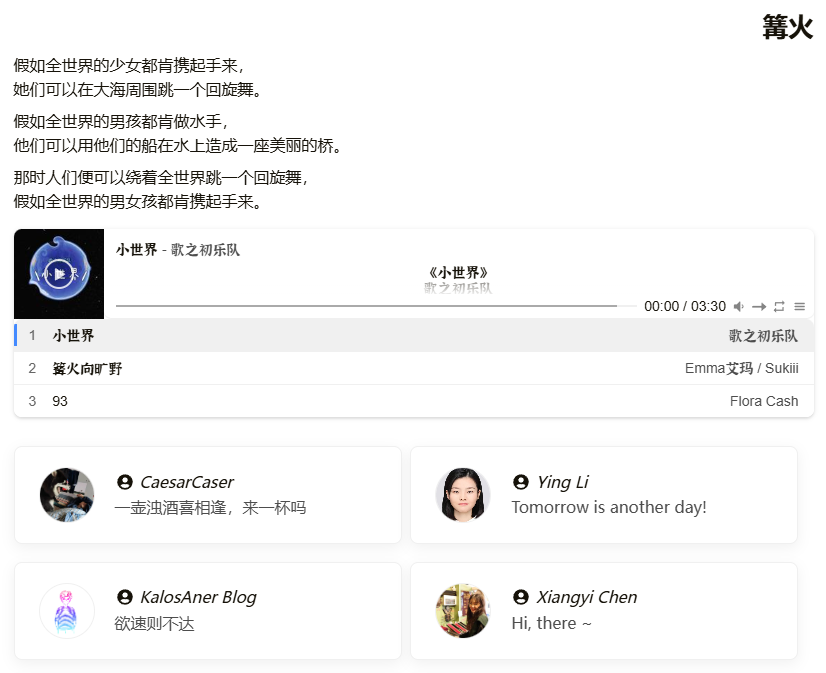
效果截图
维护建议
自定义样式优先写在 assets/css/custom-shortcodes.css。只有当 DoIt 原始 shortcode 的 HTML 结构本身不适合继续覆盖时,再新增独立 shortcode,例如这里的 friend-custom。
这样做的好处是:主题源码保持干净,默认 shortcode 随时可用,自定义组件也有明确入口。